
Fast read
For flat-rate tariffs, use Maximum Self-Consumption mode. For Time of Use tariffs, use Time-Based Control to avoid peak pricing. Keep a 10 to 20 percent backup reserve for outages. Matching app settings to your tariff is key to maximising battery efficiency.
Which Working Mode Should You Choose?
The most important setting in the mySigen app is the Working Mode, sometimes called Operation Mode. This setting controls how your battery charges and discharges throughout the day.
If you are on a standard flat-rate electricity tariff, the best option for most households is Maximum Self-Consumption mode. In this setting, your home uses solar power first. Any excess solar energy charges the battery. In the evening, your home automatically draws power from the battery instead of buying electricity from the grid. For flat-rate plans, this is typically the most efficient and cost-effective setup.
If you are on a Time of Use tariff, where electricity is more expensive during peak evening hours and cheaper overnight, the better option is Time-Based Control mode. This allows you to schedule when the battery charges and discharges. For example, you can set the battery to discharge during expensive peak hours and even charge from the grid during cheaper off-peak times if needed.

Should You Use Fully Fed to Grid Mode?
The Fully Fed to Grid mode prioritises exporting as much solar energy as possible back to the grid. While this may sound attractive, it is usually not the most economical choice in Australia.
Feed-in tariffs are generally much lower than the rate you pay to buy electricity. In most cases, storing and using your solar energy later provides greater savings than exporting it. This mode may only suit specific circumstances, such as very high feed-in tariff contracts.
What Is the Ideal Backup Reserve Setting?
Another critical setting is the Backup Reserve or Discharge Cut-Off SOC. SOC stands for State of Charge and represents how much energy remains in the battery.
This setting determines how much capacity is kept in reserve for blackouts. While Sigenergy batteries are designed to safely discharge fully, it is generally wise to maintain a buffer. A backup reserve of around 10 to 20 percent is a common and practical setting. This keeps a portion of stored energy available in case of an unexpected outage while still allowing most of the battery to be used for daily savings.
How Do You Match Settings to Your Tariff?
The best battery settings depend entirely on your electricity plan. If you are on a flat-rate tariff, Time-Based Control mode will not provide additional benefit. If you are on a Time of Use tariff, not configuring peak discharge windows may reduce potential savings.
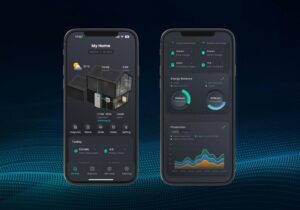
Your next step should be to review your latest electricity bill and confirm your tariff structure. Then open the mySigen app, navigate to the system settings, and ensure the Working Mode aligns with your pricing plan. Finally, review your backup reserve level and adjust it based on how much blackout protection you want.
Optimising these few settings can significantly improve how effectively your battery reduces grid usage and electricity costs.