Fast read
The mySigen app shows real-time energy flow between your solar panels, home, battery and the grid. Solar should power your home during the day and charge the battery. At night, the battery should discharge to run your home. The grid icon shows when you are importing or exporting electricity.
What Am I Looking At on the Home Screen?
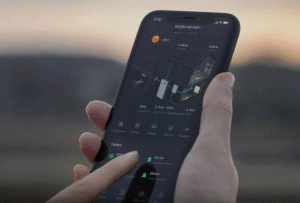
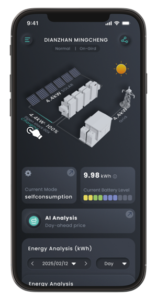
When you open the mySigen app, the first screen you see is the live dashboard. This is the main monitoring screen and shows an animated energy flow diagram. While it may look complex at first glance, it is simply a visual map of where your electricity is coming from and where it is going.
You will typically see four key icons: solar panels, your home, the battery and the grid. The moving lines and arrows between these icons show the direction of power flow in real time. The numbers displayed in kilowatts indicate how much energy is moving at that exact moment.
How Do I Check If My Solar Is Working Properly?
Start by looking at the solar icon. During daylight hours, you should see power flowing away from the solar panels. The number displayed next to the solar icon shows how much electricity your system is generating in real time.
If the sun is shining and the number is strong, your system is producing well. If clouds pass overhead, you will notice the generation number drop accordingly. This live feedback helps you understand how weather conditions directly affect your solar production.
How Do I Know If My Battery Is Charging or Discharging?
The battery icon shows two key pieces of information: the state of charge percentage and the direction of energy flow.
If your solar system is generating more electricity than your home is using, you will see energy flowing into the battery. This means it is charging. The app will show how quickly it is charging in kilowatts.
In the evening or when solar production is low, the arrow will reverse direction. Energy will flow out of the battery and into your home, indicating that it is discharging. The percentage will gradually decrease as stored energy is used. This is how your system reduces grid reliance during peak periods.
What Does the Grid Icon Tell Me?
The grid icon shows whether you are importing electricity from the network or exporting surplus solar energy.
If you see energy flowing from the grid into your home, it means your solar and battery cannot fully cover your current usage. If the battery is full and your solar panels are still producing excess power, you will see energy flowing from your home to the grid, which means you are exporting electricity.
On an ideal sunny day, you would see solar powering your home while also charging the battery. At night, you would ideally see the battery powering your home with little to no energy being drawn from the grid.
It is important to remember that small amounts of grid import can still occur even when the battery appears full. This can be due to minor standby loads or system balancing. Short delays in app updates can also occur, especially during sudden changes in household usage.